Mobile Backup 33.1.1
Publisher Description
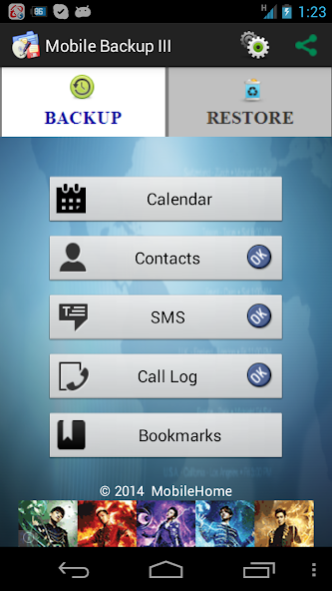


This App easily backup and restore your mobile data (Calendar, Contacts, SMS, Bookmarks and Call Log) in SD card. The backup data is stored in the root directory of SD card or phone storage.
It give you a quick and simple backup restore experience when you need to reset the phone or erase all data on phone.
Now, you can restore your personal data from any phone to another phone via SD card. Easy-to-use backup solution for anytime and anywhere!
Beginning with Android 4.4, please make sure the backup files are in your external SD card before doing a factory reset on the phone. If not, please copy the entire backup files .txt to your external SD card.
★ Features
▶ Support Android 1.6 ~ 4.4 Platform or higher.
▶ Cannot support rooted/ modified phone completely.
▶ Backup and Restore to/from SD card or phone storage.
▶ User can change backup folder path in Settings.
▶ The backup data can be stored in SD card as below.
[ Calendar ] /sdcard/Backup-Calendar.txt
[ Contacts ] /sdcard/Backup-Contacts2.1.txt
[ SMS ] /sdcard/Backup-SMS.txt
[ Call Logs ] /sdcard/Backup-CallLog.txt
[Bookmarks] /sdcard/Backup-Bookmark.txt
★ NOTE:
Please do not hesitate to contact us if you experience any unexpected issues, or have additional questions or concerns regarding this App.
Please send email to developer with issues for improvement.
Thank you.
About Mobile Backup 3
The company that develops Mobile Backup 3 is MobileHome Corp.. The latest version released by its developer is 3.1.1. This app was rated by 19 users of our site and has an average rating of 4.6.
To install Mobile Backup 3 on your Android device, just click the green Continue To App button above to start the installation process. The app is listed on our website since 2019-05-28 and was downloaded 2,354 times. We have already checked if the download link is safe, however for your own protection we recommend that you scan the downloaded app with your antivirus. Your antivirus may detect the Mobile Backup 3 as malware as malware if the download link to mobilehome.backup is broken.
How to install Mobile Backup 3 on your Android device:
- Click on the Continue To App button on our website. This will redirect you to Google Play.
- Once the Mobile Backup 3 is shown in the Google Play listing of your Android device, you can start its download and installation. Tap on the Install button located below the search bar and to the right of the app icon.
- A pop-up window with the permissions required by Mobile Backup 3 will be shown. Click on Accept to continue the process.
- Mobile Backup 3 will be downloaded onto your device, displaying a progress. Once the download completes, the installation will start and you'll get a notification after the installation is finished.
Program Details
System requirements
Download information
Pricing
Version History
version 3.1.1
posted on 2019-05-28
1. Fixed bugs for Android 8.0 & above version.
2. Enhance data restore performance.
3. Improve user operation interface.
version 3.1.1
posted on 2019-05-28
1. Fixed bugs for Android 8.0 & above version.
2. Enhance data restore performance.
3. Improve user operation interface.
version 3.0.3
posted on 2015-11-24
1. Fix submenu of app sharing actions,2. Enhance data restore performance,3. Improve user operation interface
version 2.4.0
posted on 2011-05-04
Several fixes and updates
